Case StudyHero AI
Designing & integrating cutting-edge AI solutions for enterprise SaaS.
Transforming a powerful, but increasingly complex, security automation platform into an intuitive, AI-augmented experience for technical users, addressing market competitiveness and user flow bottlenecks.
TL;DR
Co-designing AI workflows, an LLM data foundation, and responsible-AI principles.
As lead designer and manager, I drove the end-to-end design of Hero AI, Swimlane Turbine's flagship AI initiative, over 2 years and 4 months. I collaborated with executives, product management, engineers, and data scientists to integrate AI into workflows for our users.
What I did
- Strategic AI Workflow Design: co-designed core AI workflows (prompt engineering, RAG, trust-building) integrating fine-tuned LLMs into mission-critical security operations.
- Data Foundation & LLM Strategy: co-designed data model architecture for proprietary LLM use, ensuring data privacy and enabling clean AI training. Influenced LLM selection (OpenChat 3.5 to MistralSmall) for optimal performance.
- User-Centric AI Principles: defined and secured executive alignment on Responsible AI principles (Human-in-the-Loop, Transparency) to foster user trust.
- Research & Iteration Leadership: led comprehensive user research to validate design patterns, driving high adoption and engagement. Established Pendo to track usage metrics for continuous optimization.
Impact
- $1M in Annual Customer Savings: achieved through automation and efficiency gains, like streamlining incident response and reducing manual data mapping.
- Enhanced User Productivity & Trust: interfaces that streamlined tasks, reduced cognitive load, and built confidence in AI outputs through transparency and control, which was consistently validated in user testing.
Context
Background
Hero AI was built into Swimlane Turbine, a Security Automation platform used by Security Analysts and DevOps teams who write Python automation scripts, manage JSON configuration, and debug system logs (the platform itself is covered in the Swimlane Turbine case study). Its flexibility to integrate with any security tool was what attracted customers, and it was also what made it increasingly complex to use.
Problem
Analysts were spending time on work that slowed incident response: mapping fields from disparate security tools by hand, writing automation scripts from scratch, and piecing together case context before they could act. At the same time, competitors were moving quickly on AI, and the company chose to invest in it to stay competitive. The challenge was bringing AI into mission-critical security workflows in a way analysts would actually trust.
Process
From messy data to trusted, human-in-the-loop AI.
01
Understanding the data
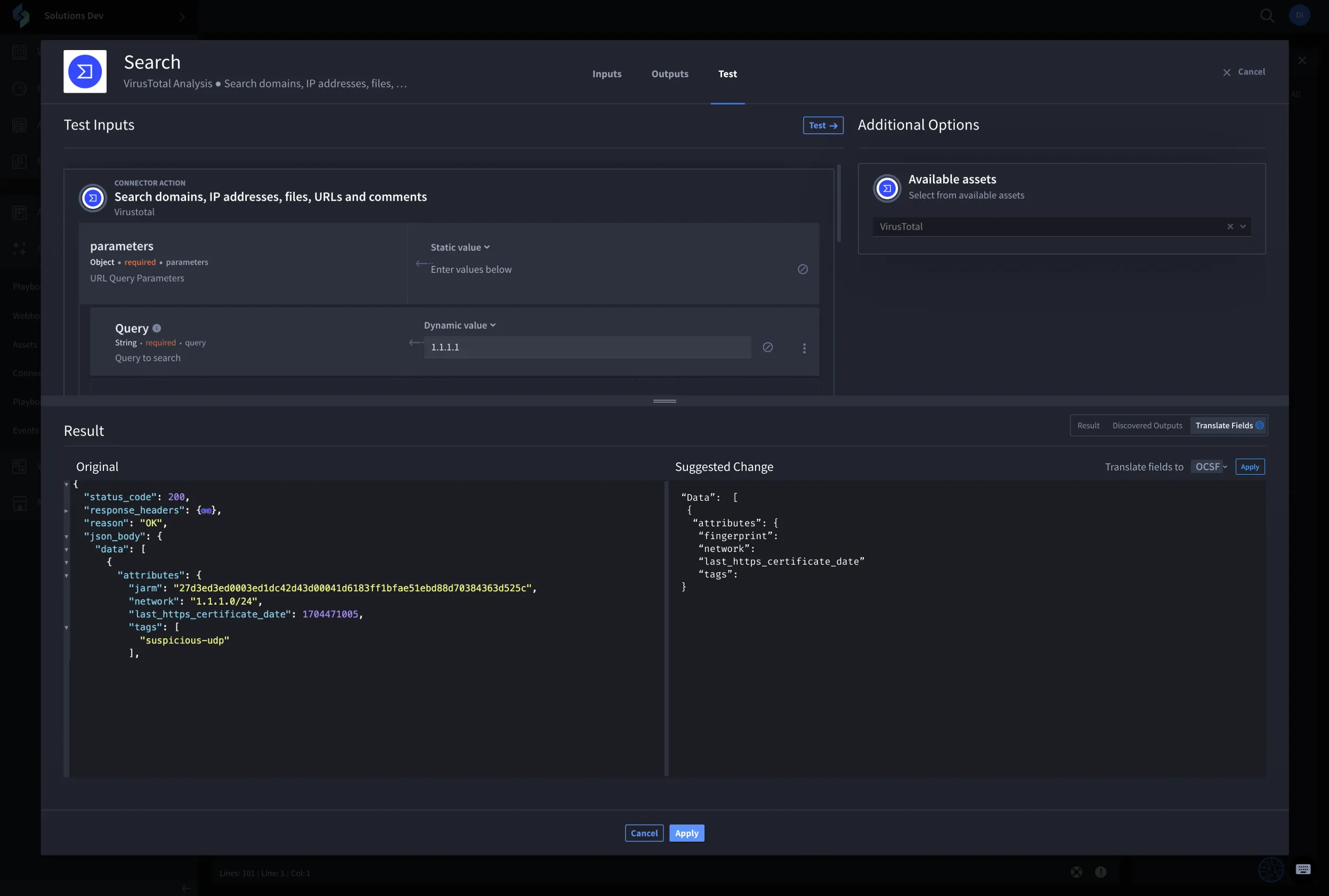
One of the first problems I worked on was defining how data would flow through the product and making sure it could be understood by everyone. Data ingested into the platform was often from disparate security tools and APIs, varying wildly in format and meaning. For example, "IP address" might be labeled "src_ip," "source_address," or simply "ip" across different systems, making unified analysis impossible. I began an Object-Oriented UX analysis to map these discrepancies and socialize the Universal Workflow Diagram across the business.
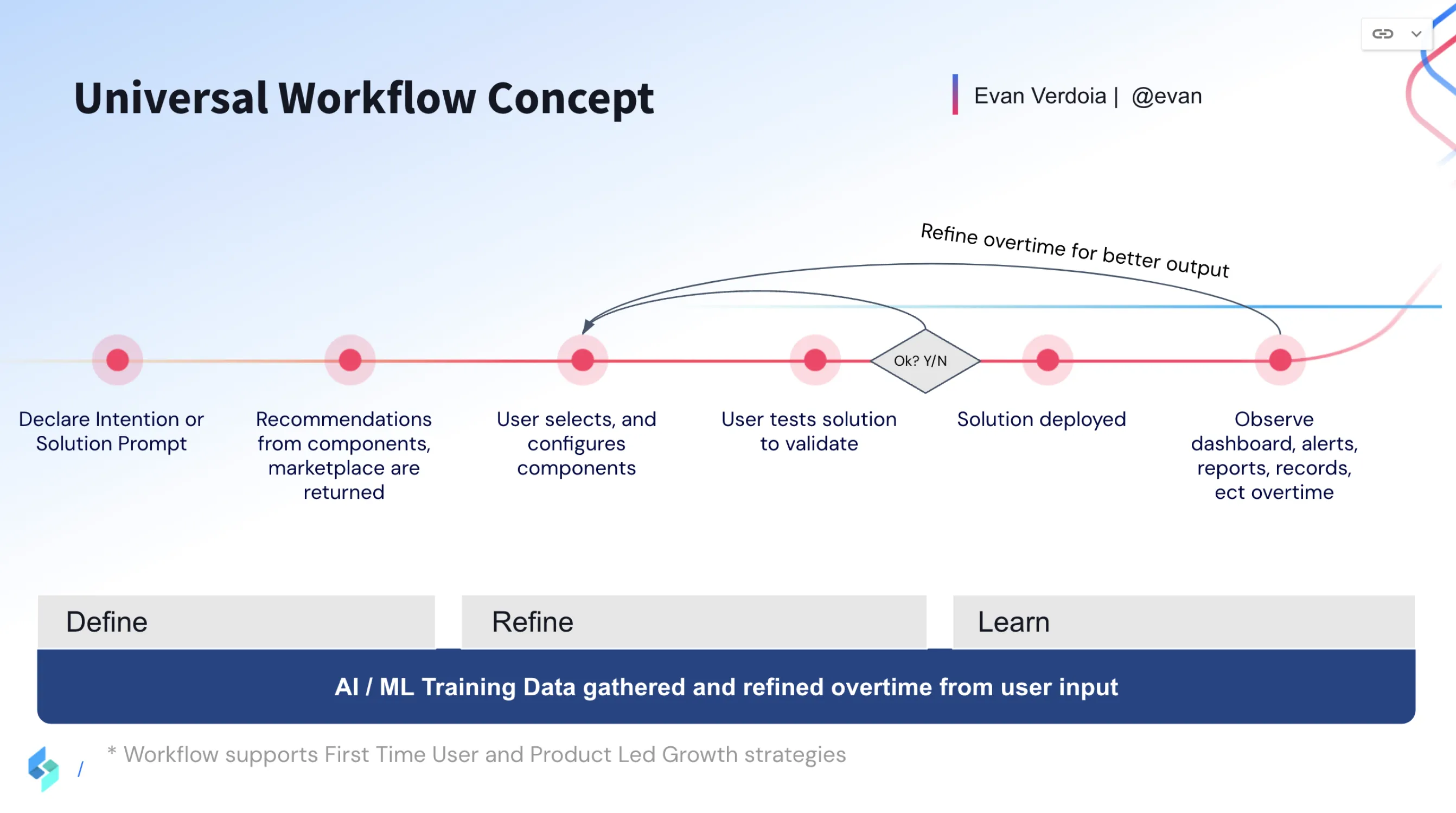
I partnered with my Principal Architect to create a common data schema that mapped each source's metadata based on the OOUX. This structured approach not only gained support and business funding, but crucially meant we could normalize, aggregate, and train the future AI on a clean dataset.
02
Concepts and research
Next, I began conceptualizing how users would meaningfully interact with AI, using a simple decision framework as a benchmark:
- Is it usable? Is the experience intuitive and will it help build confidence in the user?
- Is it useful? Will this feature bring value and help users achieve their goals?
- Is it responsible? Are the limitations and capabilities of the feature clear, and is it easy for people to provide feedback?
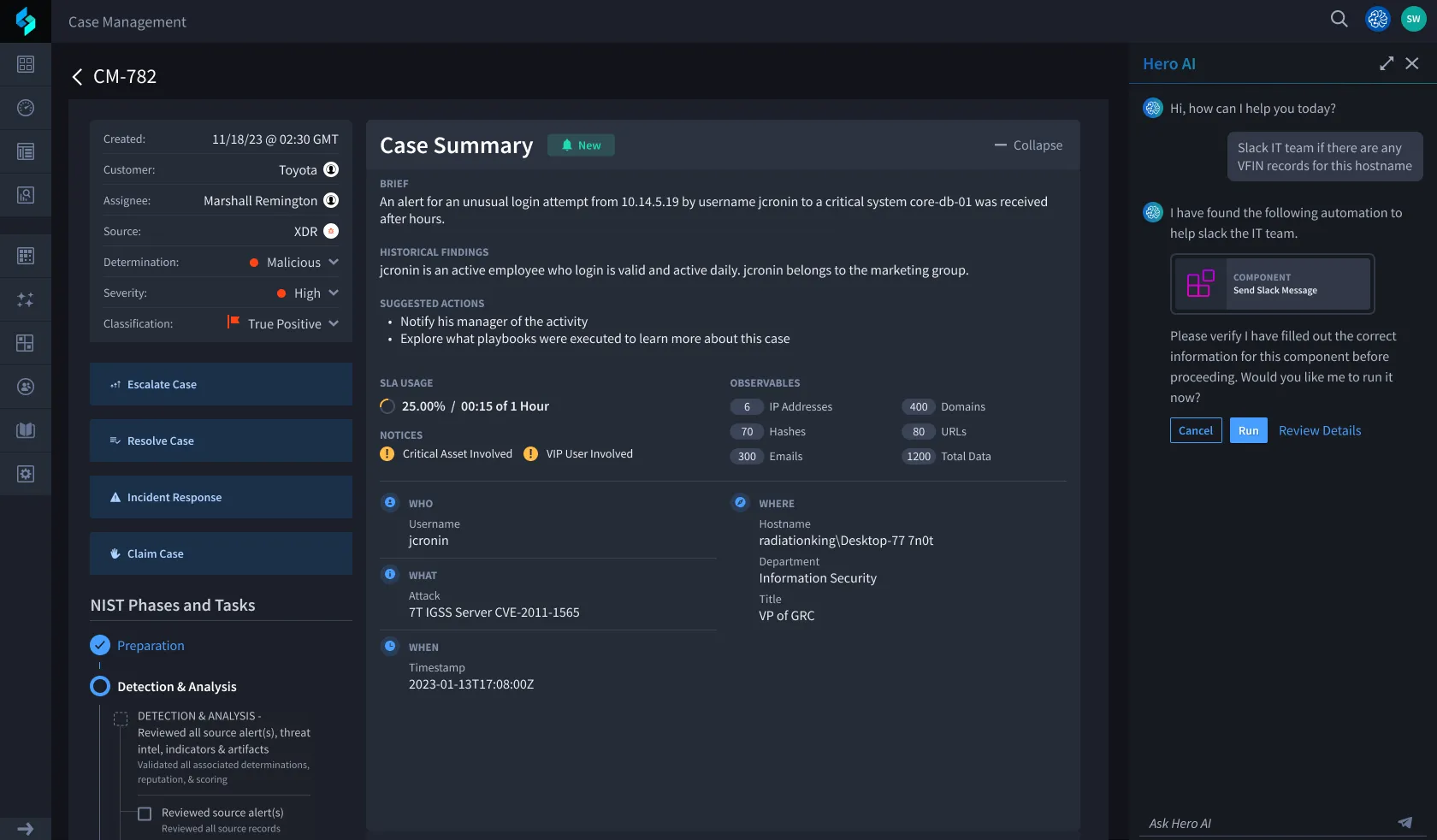
I started with two different AI form factors: Embedded, a chatbot that helps users comprehend, ask follow-up questions, or provide additional support to tasks, and Contextual, which makes AI available to aid a common process like code transformation, giving users control and freedom to choose whether to use it.
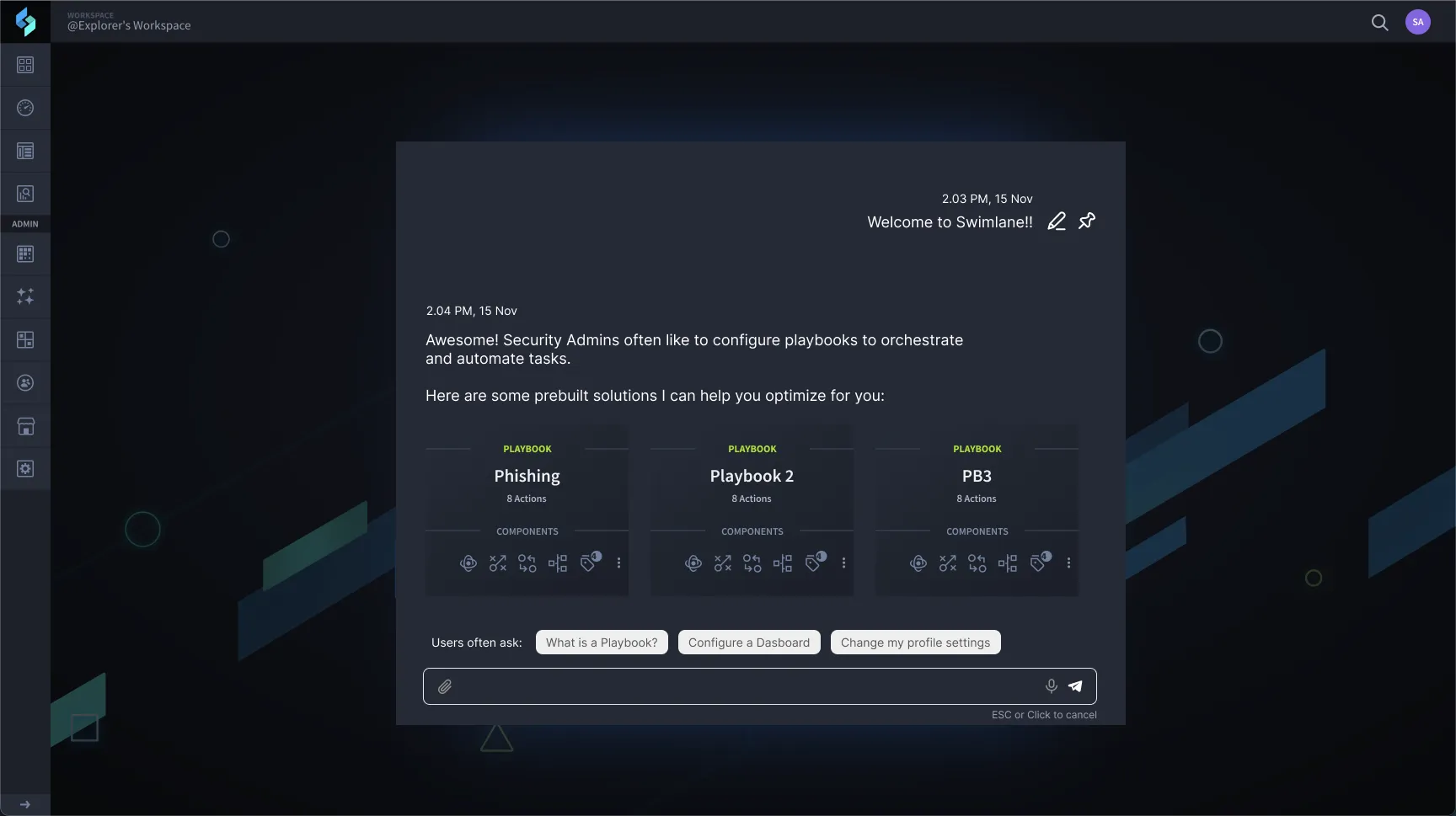
Customer conversations showed the two modes mapped to distinct moments, not a single preference. An embedded view made sense when someone was already working in context (on the canvas, building a new workflow) and wanted the AI alongside without leaving that surface. A full-screen experience made more sense for heavier moments: a long AI text response, or a task that needed deeper collaboration to work through. During testing, users liked having the embedded view for quick, lightweight tasks since it stayed anchored in the UI as they navigated the app. But when they needed to dive deeper, like reviewing AI outputs or doing more complex work, they preferred switching to a full-screen mode. This insight led to a hybrid design that customers said greatly improved their satisfaction and productivity for both quick lookups and complex analysis.
03
Aligning on AI principles
As AI became a larger focus for the business, our team met for a week in London. My PM asked me to lead the opening session with a presentation of concepts and research findings, followed by a dot voting exercise to gain consensus on the principles we wanted in our AI. The principles voted most important were:
- Human-in-the-loop workflows
- AI-powered decision support
- Privacy and Security
- Transparency and visibility
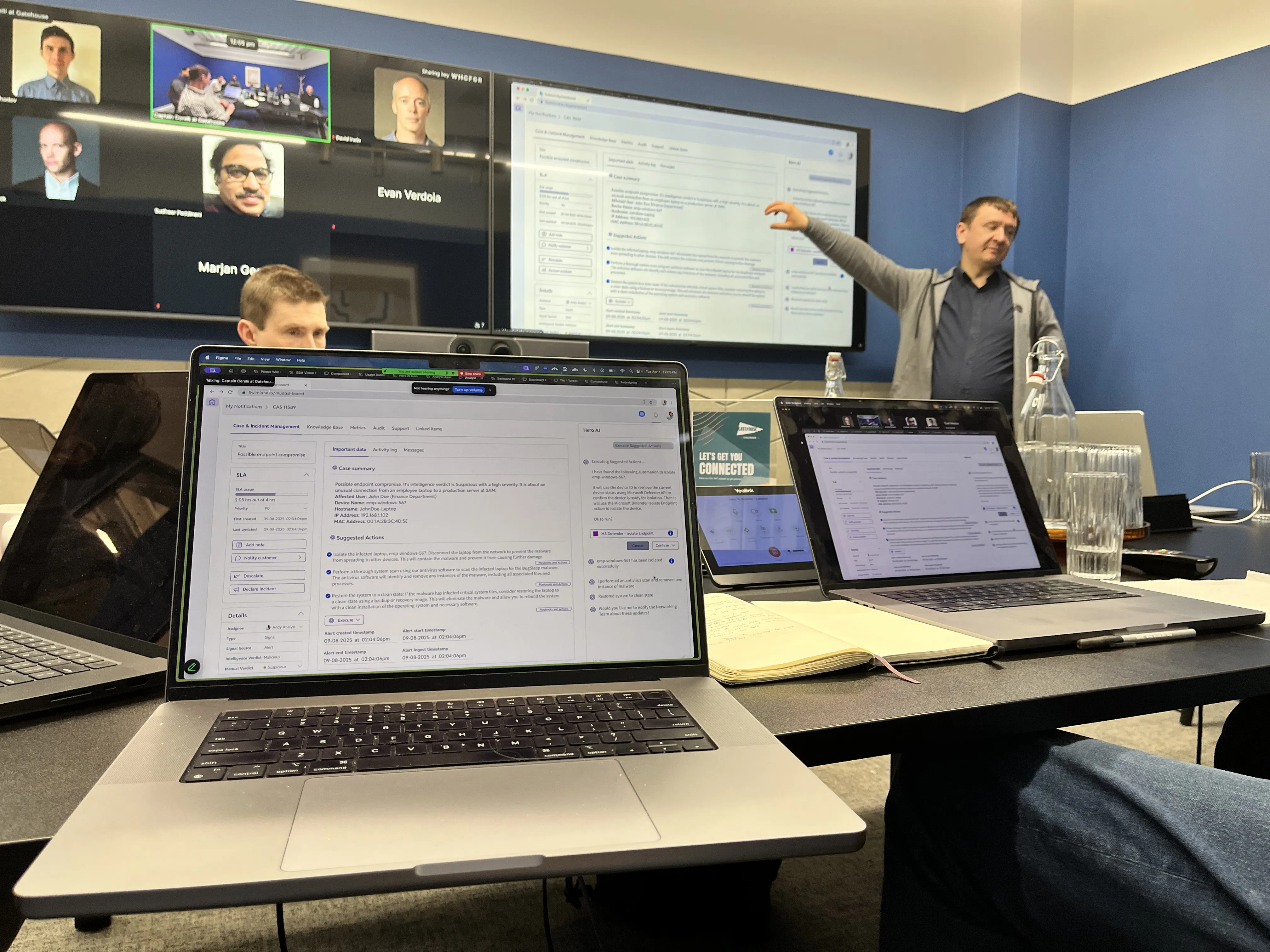
I chose dot voting because it was approachable and gave everyone in the room, including more introverted team members, space to articulate what AI meant to them. I expected some debate, but the team was fairly aligned. We voted to build contextual prompts first, then auto-generated prompts, then assistant-like AI use cases. It was a crawl-walk-run approach as we learned more about the LLM and our customers' needs.
04
Shaping the LLM
We first used OpenChat 3.5 as our LLM. By hosting our own LLM, customers were assured their data never went anywhere it shouldn't, and we had better control to surface relevant data and extra context to support the AI's responses. OpenChat supported the reinforcement learning we wanted and met our core principles; it was fine-tuned to focus on security as its domain. After a year, we moved to MistralSmall for its better reasoning and context window.
The model landscape was moving fast enough that checking Hugging Face for new releases became a near-daily habit, exciting and daunting in equal measure. We evaluated several alternatives before settling on MistralSmall, chosen for its performance: faster and higher-quality outputs against our primary use cases. Because we didn't yet have a large library of prompts to migrate, the switch was validated mainly by testing MistralSmall's behavior directly against those use cases rather than a heavy prompt-by-prompt migration effort.
05
Prompt engineering
I designed reusable AI prompt systems including:
- Executive and Case Summaries
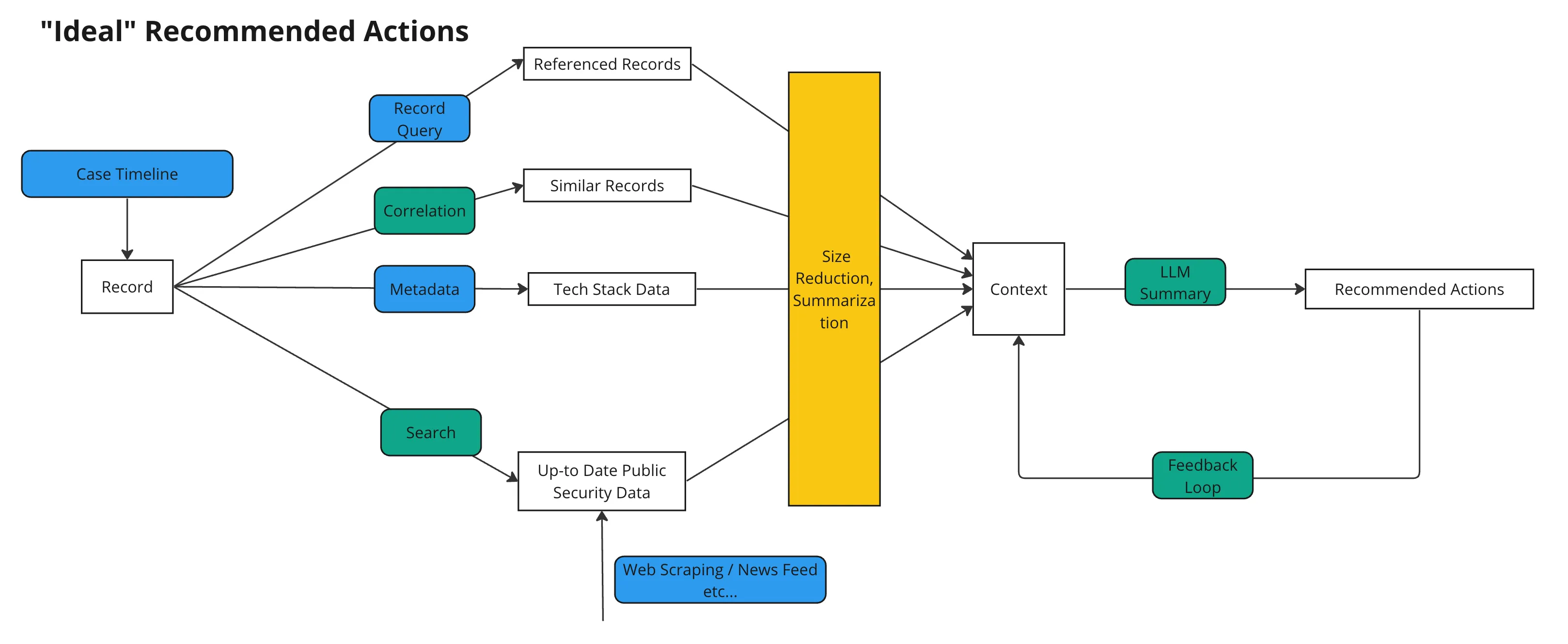
- Recommended Actions
- Schema Inference for instant data mapping, reducing manual effort and complexity of integrating disparate data sources.
- Text-to-Code generation with Python output, enabling users to create custom automation scripts more quickly and with fewer errors.
- Feedback loops for continuous human-in-the-loop tuning
We also used Retrieval Augmented Generation (RAG) to parse the specific policies, procedures, and third-party tools or integrations our customers built with the platform. This let customers build workflows for their Analysts, Orchestrators, and Administrators based on their own policies and procedures. Each prompt was designed and optimized for one very small task to ensure stability and accuracy of the output.
06
Designing for trust in the UI
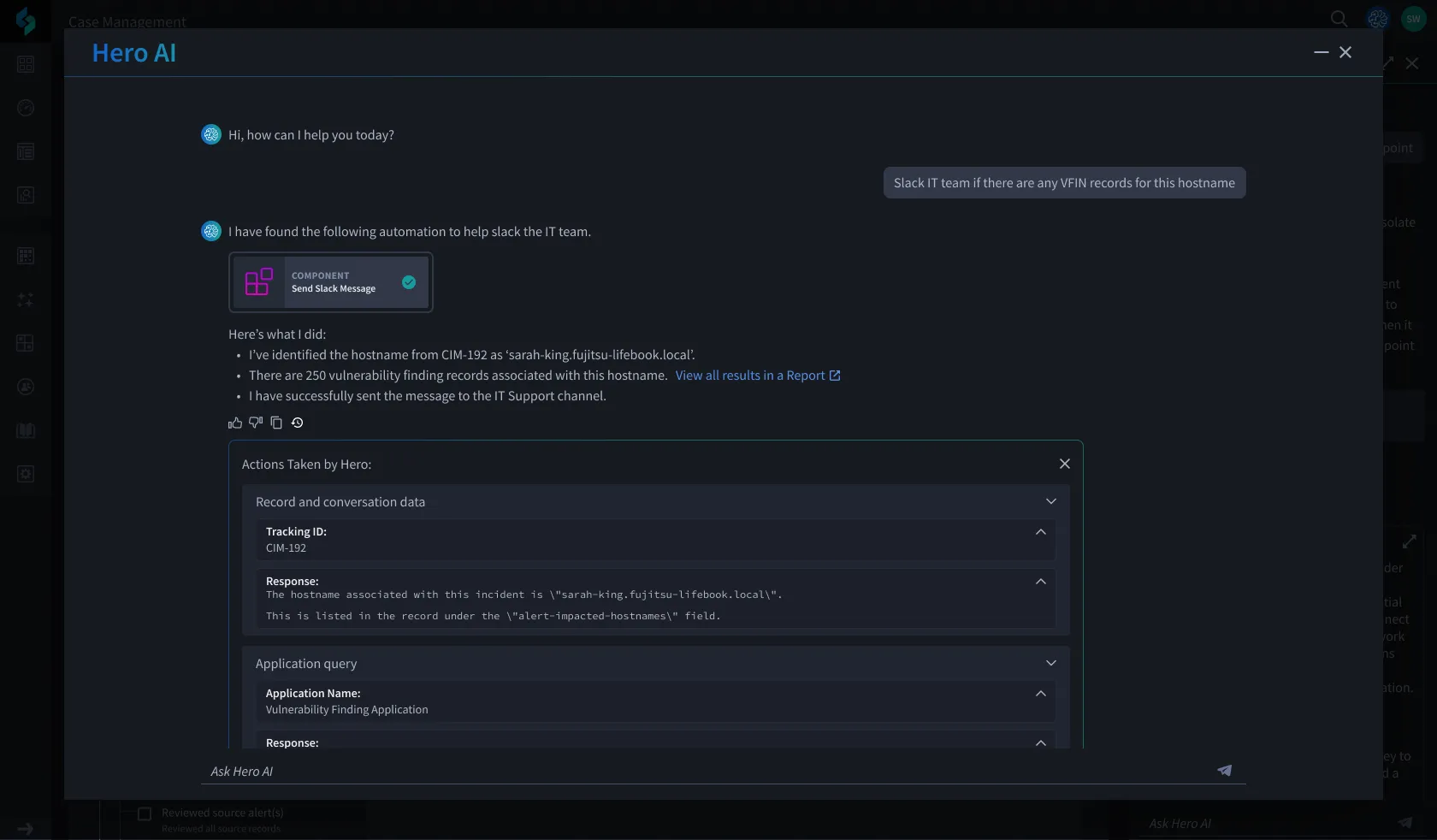
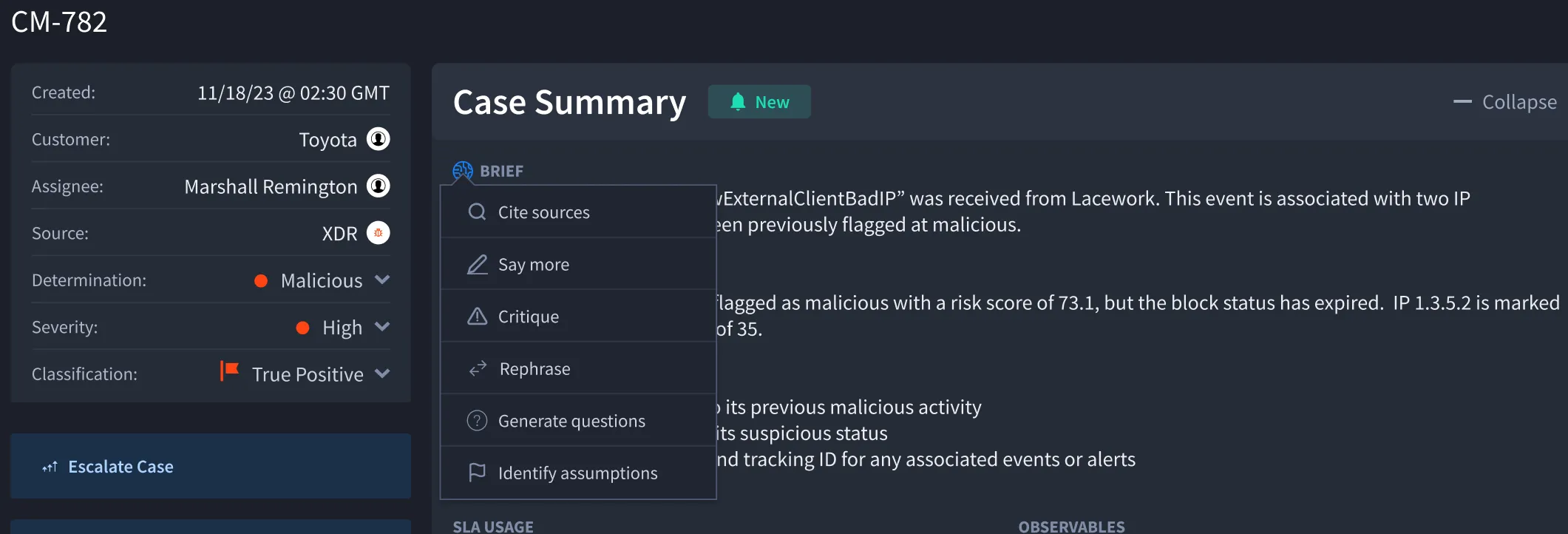
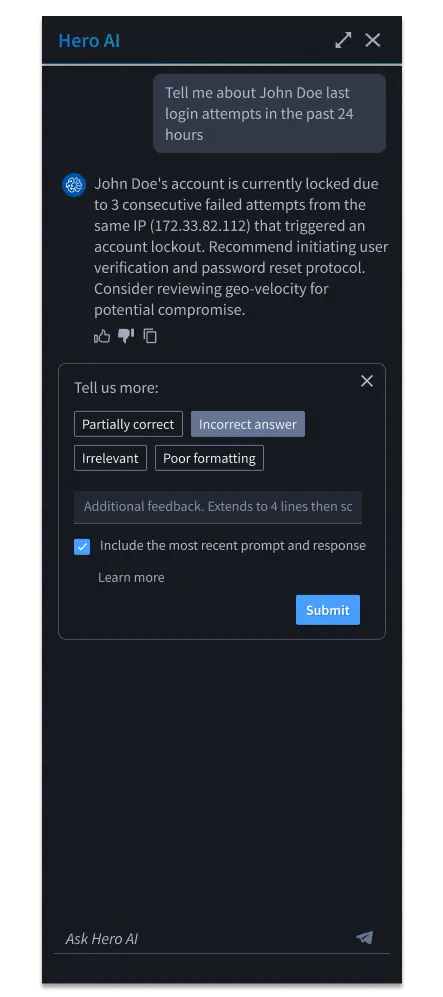
Being intentional with AI integration was very important. During user testing, users wanted a good level of control to interact with the AI, so I designed ways for users to alter outputs and provide feedback. The example below is an auto-generated brief and recommended actions that gives users context on a specific case, with the ability to get additional context or provide feedback. It's a human-in-the-loop workflow that helped our team further train the model over time.
Admins can choose to make the components they build visible to Hero AI, enabling Hero to execute actions and run components on any user's behalf.
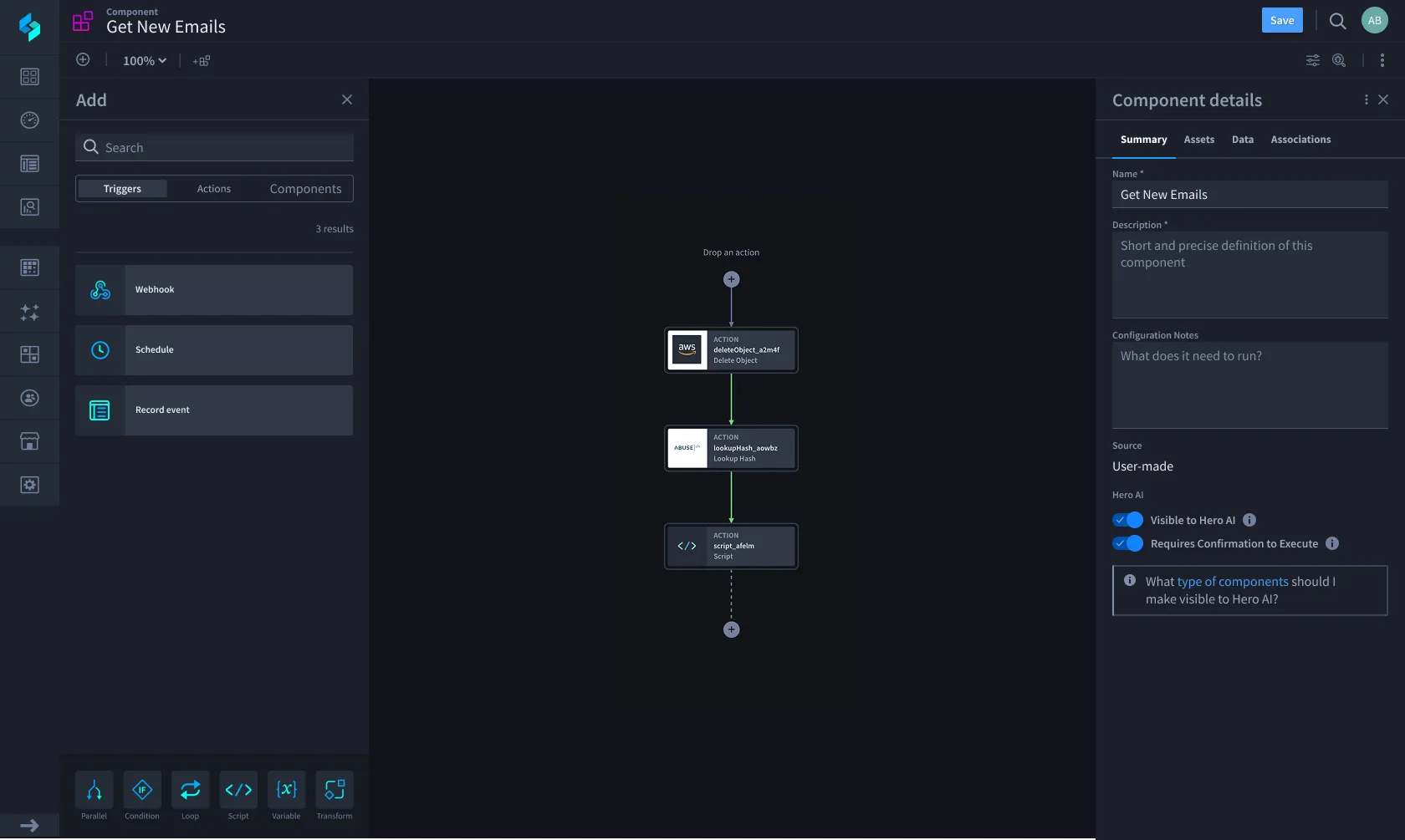
Keeping friction where it matters
Removing friction is usually the design goal, but for high-consequence actions that turned out to be the wrong instinct. The earliest workflows were optimized to move as fast as possible with as few steps as possible. Conversations with customers changed that. People needed a sense of control and a chance to verify the AI's work before committing to it, not just speed. I had to argue for keeping that friction rather than designing it away, a pattern I've since seen become common across major agentic platforms.
Through user feedback, we learned that while AI provided significant value, users were hesitant to fully trust it. To address this, we intentionally designed friction points as part of human-in-the-loop and transparency features. Admins could configure high consequence actions to require explicit approval or a review of missing context before Hero could execute them. That same approval moment fed the model directly: users could thumbs-up or thumbs-down an output, or fine-tune the input before approving a high-consequence action, turning every review into a training signal.
Underneath the UI, this friction was built on a defined state machine, not an ad hoc confirmation dialog: Hero proposes an action, verifies it has the context it needs, presents that proposal for human confirmation, executes only once approved, and logs what it did. Every high-consequence action had to satisfy that same contract, which gave engineering a consistent pattern to build against as we added new agentic capabilities, rather than a new one-off confirmation flow for each feature.
Showing its work, and failing gracefully
To reinforce trust and transparency, users can see more detail about the steps Hero took while completing a user-defined action. It's effectively a chain-of-thought view into the model's own reasoning rather than just its final output, so a user could verify why Hero recommended something, not only what it recommended.
Non-deterministic systems fail differently than traditional software, and I designed for that directly. When Hero didn't have enough confidence in an output, or a tool call didn't return usable data, the system was designed to surface that uncertainty and hand off to the user rather than guess or fail silently. That graceful-failure path kept trust intact even in the moments Hero got something wrong.
07
Measuring success
Initially, we used "conversations per session" as the main success metric to measure AI engagement. I created Pendo dashboards to track usage patterns, address friction over time, and frame discussions with the team. But conversations per session only told us engagement was happening, not whether the AI was actually helping. A high-conversation session could just as easily mean Hero was confusing someone as it could mean it was useful, so we needed a signal tied to output quality, not just usage volume. As a next step, we added contextual feedback per AI output, logged on our servers and used to fine-tune our model over time, aiming for competitive differentiation in model quality.
08
Visual style
As Hero's visual style evolved and started to stabilize, I began designing component variants that reflected its emerging visual language, distinct without overpowering the rest of the interface. This was a fun challenge, especially since a broader UI overhaul was happening in parallel (see the Swimlane Turbine case study). Since a full redesign wasn't feasible all at once, we introduced these updates incrementally, aligning them with the product roadmap to maintain cohesion throughout the evolving interface.
Outcome
- $1M in annual customer savings through automation and efficiency gains, like schema inference replacing manual data mapping and faster incident response.
- Interfaces that streamlined tasks, reduced cognitive load, and built confidence in AI outputs through transparency and control, which was consistently validated in user testing.
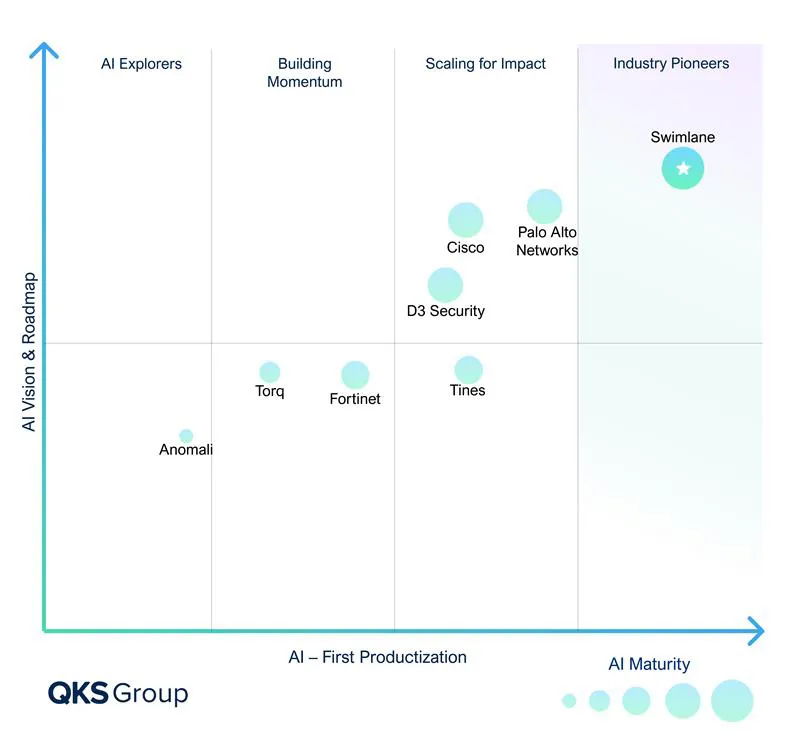
- Recognition for our approach to AI in the security space, especially compared to Palo Alto Networks, Tines, and Torq, positioning the company as a leader in AI maturity.
Reflection
The AI space is both exhilarating and fast-moving, constantly reshaping what's possible. Building a 0 to 1 AI product in this environment required rapidly absorbing new technologies and assessing the unique affordances each brought to the user experience. Embracing ambiguity and relying on a tightly aligned team that could pivot, learn, and adapt weekly was key to our success. Design's role in AI is more vital than ever: with powerful new tools and methods at our disposal, we now face even more complex challenges, with the potential to impact far more people than even my previous enterprise work, which already reached millions daily.
When I left, the team was building an Admin module specifically for AI, adding the ability to connect to any Model Context Protocol (MCP) server and Agent2Agent protocols to further differentiate the platform's capabilities.